
Passwords are hard enough to manage in your own life and your work life. Having a set that gets handed over year after year is an even bigger challenge. And bigger challenges lead to more security problems. To make handing off PTA logins more manageable: put each account in the PTA’s name rather than a volunteer’s, share the ones that genuinely need sharing through a password manager, and move two-factor codes off any one person’s phone.
Every time I’ve taken over a board role, as treasurer and in VP positions, part of the handoff was a spreadsheet or a document listing accounts, usernames, and passwords. When I went to use them, some worked, some were out of date, and a few sent their verification code to a phone number I did not have. Each time, I replaced the document with a password manager, and when it came time for me to transition, I handed that over instead. It took just a little bit of work, but the payoff was well worth it.
Plans and prices below were checked in September 2026. Confirm them before you buy.
Start with the email, not the passwords
 Before worrying about what the passwords are, look at what address they reset to. Every password reset and most second factors land in an inbox. If your PTA’s PayPal, auction platform, and website all reset to the outgoing treasurer’s personal Gmail, then that person still controls every account, no matter how carefully the passwords were written down.
So the first move is ownership:
-
Register accounts to an address the PTA owns, something like
treasurer@yourpta.orgorpresident@yourpta.org. Which specific person reads that mail this year is a setting you change each June, and the next treasurer inherits every past conversation along with it. - Check the recovery email and recovery phone on every account, not just the login. These are set at signup and can still point at a volunteer who left years ago.
- Know who controls the domain. If your role addresses live on your own domain, whoever holds the registrar login holds everything downstream of it. That account belongs on the list too, along with the auto-renew date.
If you do not have addresses like that yet, Google for Nonprofits includes Google Workspace at no cost for validated 501(c)(3) organizations, which gets you Gmail on your own domain. Validation runs through a partner called Goodstack and takes a couple of weeks. It asks for documentation of your 501(c)(3) status, and many local units are covered by their state PTA’s group exemption rather than holding their own determination letter. Your state or council office can tell you what to submit.
Not every account should be shared
A password manager makes sharing easy, which makes it tempting to share everything. Some accounts should never be shared, and some that are shared today do not have to be.
Keep individual, always. Online banking and bill pay, where each authorized signer sets up their own credentials. The IRS e-file account, which uses an ID.me or Login.gov identity verified against a person’s own photo ID and cannot be handed to anyone. Anything tied to the bank signature card. The PTA treasurer transition guide covers the signature card process, and the 990 filing guide covers why the e-file account is personal.
Give each officer a seat if the service offers one. Your website platform, your membership system, and most newsletter and design tools let you add users with their own passwords. Adding and removing a user beats sharing a password, because you can see who did what and removing access takes one click.
Hand the mailbox over, do not replace it. The role email is the one account where starting fresh is a loss. Years of correspondence with the bank, the school, and your vendors live in it, along with whatever sits in its shared folders, and the next treasurer wants all of it. Pass the account itself along and have the incoming officer change the password, rather than opening a new address and leaving the history behind.
Share the login where there is no other option. Payment platforms, store accounts, corporate matching portals, and older fundraising tools often have exactly one login and no concept of a second user. These are the accounts a password manager is for.
What is on the list
Working from categories surfaces the accounts that only come up when they are needed:
- Money movement: online banking, bill pay, the check vendor, PayPal, Venmo, Square, Stripe, your merchant account
- Fundraising and events: the auction platform, fun run or read-a-thon vendor, spirit wear store, sign-up and ticketing tools, corporate matching portals
- Membership and PTA structure: your membership system, the state PTA leader portal, your insurance carrier’s portal
- Web and communication: the website or CMS, the domain registrar, email and Workspace administration, your newsletter tool, social accounts, design tools
- Compliance: the IRS e-file provider, state charity registration, state sales tax, and where the EIN letter and bylaws live
- Vendors and physical access: warehouse club memberships, Amazon Business, the PO box, the storage closet or safe combination
Record it as an inventory rather than a password list. The documenting the treasurer role guide makes the same point about the rest of the job: write down where access lives, and let the password manager hold the credentials themselves.
| Account | What it is for | Access | Password | Second factor |
|---|---|---|---|---|
| US Community Bank | Checking, bill pay | Each signer, own login | Personal, never shared | Bank app on each phone |
| PayPal | Dues and spirit wear | One shared login | Shared vault | Authenticator code in vault |
| Membership system | Rosters and renewals | Officer seats | Personal, each officer | Personal, each officer |
| Auction platform | Spring auction | One shared login | Shared vault | Backup codes in vault |
| Domain registrar | yourpta.org | One shared login | Shared vault | Authenticator code in vault |
Picking a password manager
Any of these is a large improvement on a document. The differences that matter for a PTA are what sharing costs and whether the next officer can use it on whatever device they happen to own.
- 1Password is the most polished, and the one I recommend to people who would rather not think about it. It discounts its business plans for nonprofits, and if one person is going to hold the vault, an individual account runs under $50 a year.
- Proton Pass is sold several ways, from a personal plan through a family plan to a business tier, and Proton offers a nonprofit discount across its whole suite. Pick the shape that fits your board.
- Bitwarden is the cheapest way in. Its free plan holds unlimited logins, stores passkeys, and shares with one other person, which is enough for a president and treasurer to hold the shared logins together. The Families plan is $3.99 a month, about $48 a year for six people, which could cover everyone needed on your board.
1Password has no free plan, only a trial. Proton Pass and Bitwarden do, and on both the free plan will hold your passwords while generating the two-factor codes inside the vault requires a subscription.
If free is a hard requirement, you can get there with two apps instead of one. Bitwarden’s free plan holds and shares the passwords, and Ente Auth holds the two-factor codes and shares those with the whole board. Ente Auth is free, open source, and runs on every platform. The trade is that your logins and your codes now live in two places, which is one more thing to hand over.
KeePassXC is the other free route, and it keeps everything in one file: passwords and codes together, no accounts and no subscription. Put the file in the PTA’s shared drive and open it with KeePassXC on a computer, Strongbox on an iPhone, or KeePassDX on Android. Here you are the sync. Everyone holding the file and the master password sees everything in it, and two people editing at once can collide.
Avoid building this on the password manager built into a phone or a browser. These are tied to specific platforms and don’t export well if someone new has a different setup.
What a password manager actually does
 If you have not used one: it is a browser extension and a phone app sitting on top of an encrypted vault.
- It fills logins for you, which means nobody needs to read a password out loud or retype one from a document.
- It generates random passwords, so the PayPal password has nothing in common with the auction platform password and neither can be guessed from your school’s name and mascot.
- It notices when a password changes and offers to update the stored copy, which keeps a shared vault from going stale.
- It holds the second factor too, generating the six-digit codes and storing passkeys and backup codes alongside the password.
- It holds more than passwords. The EIN, the PTA’s mailing address and phone number, the bank’s routing number, the insurance policy number: the details you retype onto forms all year. Stored once, they fill themselves in, and they are easy to find.
- It shares by group, not by copy. You put the PTA’s shared logins in one vault, add the officers who need them, and remove people when their term ends. Nothing has to be resent, and there is no old copy of the document sitting in someone’s downloads folder.
Two-factor without a shared phone
Two-factor needs special attention because the default method is often a personal phone number.
Move shared accounts to authenticator codes and store them in the shared vault. Every password manager here can generate the six-digit codes in place of a text message. Storing the code generator beside the password does make the vault a single point of access, but the vaults themselves require multifactor authentication, and it’s typically a tradeoff worth making.
Download the backup codes. Most sites give you a set of one-time recovery codes when you turn on two-factor. These can also be stored in your password manager in the notes section connected to the specific account.
Passkeys beat codes, where a site offers them. A passkey replaces the password and the code together: you unlock the account the same way you unlock your phone, with a face, a fingerprint, or a PIN. Nothing gets typed or read aloud, so there is nothing for a fake login page to capture. That makes them fast, and the one second factor that cannot be phished. Create the passkey inside the shared vault rather than on a personal phone.
Some sites only send text messages. For those, the question is whose phone number is on file. Record it in the inventory and change it as part of the handoff. It also doesn’t hurt to email support and ask for an authenticator or passkey alternative. If enough of us ask, maybe they’ll listen!
Beware dedicated numbers. They are their own trap. Free internet numbers are often rejected by banks and payment platforms, a prepaid SIM costs real money every year and has to be kept active by someone, and the small services that rent numbers tend to be short-lived, shared, or both. Losing the number means losing the accounts attached to it. If you do use one, make sure it hangs off the PTA’s own account rather than a volunteer’s and write down where it is.
Security questions: answer as the PTA
Security questions are a second password wearing a costume, and they cause a specific handoff problem. If the outgoing treasurer answered “what was your first car” honestly, the incoming treasurer has no way to know it.
The fix is to stop treating them as questions about you. Answer them as though the PTA itself is the person:
- What was your first car: the school mascot
- City where you were born: the city the PTA was chartered in
- Mother’s maiden name: the school’s name
Pick answers from facts about the organization, keep them consistent across accounts, and write them in the vault entry alongside the password. Your password manager has fields on every item for exactly this.
Better still, let the generator produce a random string and store that as the answer, since nothing requires the answer to resemble the question. Answering with your real mother’s maiden name puts your own security answers, the ones your own bank uses, into a vault that every future board member can read.
If you inherited nothing
- Try the reset flow first on the address the account was registered to. If your PTA has role addresses and you have access to the inbox, this solves most of the list without talking to anyone.
- Ask the previous officer. If they do not know, they may know who does.
- Claim the account as the organization. Payment platforms and most business services have an ownership transfer or account recovery process for exactly this. Expect to provide the EIN, a letter on your PTA’s letterhead, board minutes electing the current officers, and the ID of the person taking over.
- Start clean if the trail is cold. Open a new account in the PTA’s name with a role address, move the activity over, and close the old one once nothing depends on it. Note the balance and any stored payment methods before you do.
The handoff itself
Set the vault up as you go along. Once it exists, the annual turnover is a short list:
- Add the incoming officers to the shared vault, and remove the outgoing ones
- Rotate the shared passwords, the same way you would re-key a lock after a move
- Update the recovery email and phone on any account still pointing at someone who left
- Change the two-factor phone number on the accounts that only support text messages
- Remove departing officers as users on services where they had their own seat
- Check stored payment methods for personal cards, and swap in the PTA’s
- Confirm the backup codes in the vault are the current ones
When it is just one person
Plenty of PTAs do not have two officers who will both keep a vault. If it is only you, the account itself is what gets handed over, so set it up as the PTA’s rather than as yours.
- Register the password manager account to the PTA’s role email, not your personal one, and set its recovery address there too.
- Print the recovery kit or emergency code it gives you at signup and store it with the PTA’s permanent records.
- At turnover, hand the account over and have the incoming treasurer change the master password straight away, so the login stops being yours. That beats exporting everything to a file, which puts you right back where this article started.
- Add a second officer if you can. A single point of failure is bound to break.
Where Volo Cash helps
 Volo Cash has no password to hand off. Signing in is either your Google account or a code sent to your email, and your email address is your identity in the system. There is no credential to store, rotate, or transfer. It works the same whether your board shares a
 treasurer@ address or each officer uses their own email.
The reminders that carry the rest of the treasurer’s calendar can carry this too. Put “review who has access” in June and “rotate the shared passwords” after the new board is seated, write the steps on the reminder itself, and the work shows up on schedule for whoever holds the role that year.
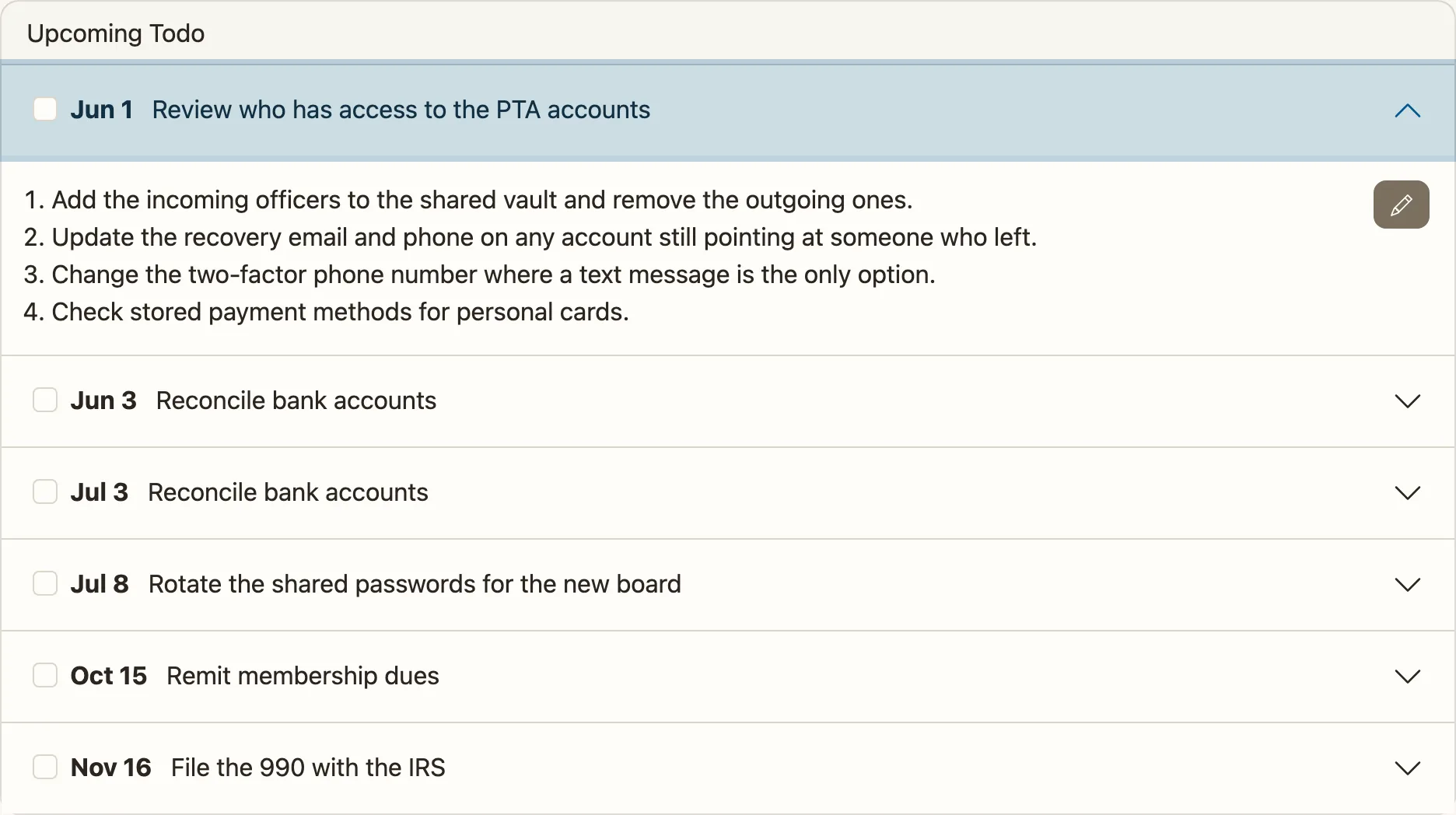
Access tasks sit alongside the rest of the treasurer’s year.
Access is one part of a handoff. The PTA treasurer transition guide covers the whole thing, documenting the treasurer role covers the knowledge that never makes it into a document, and you can try Volo Cash free for three months.